


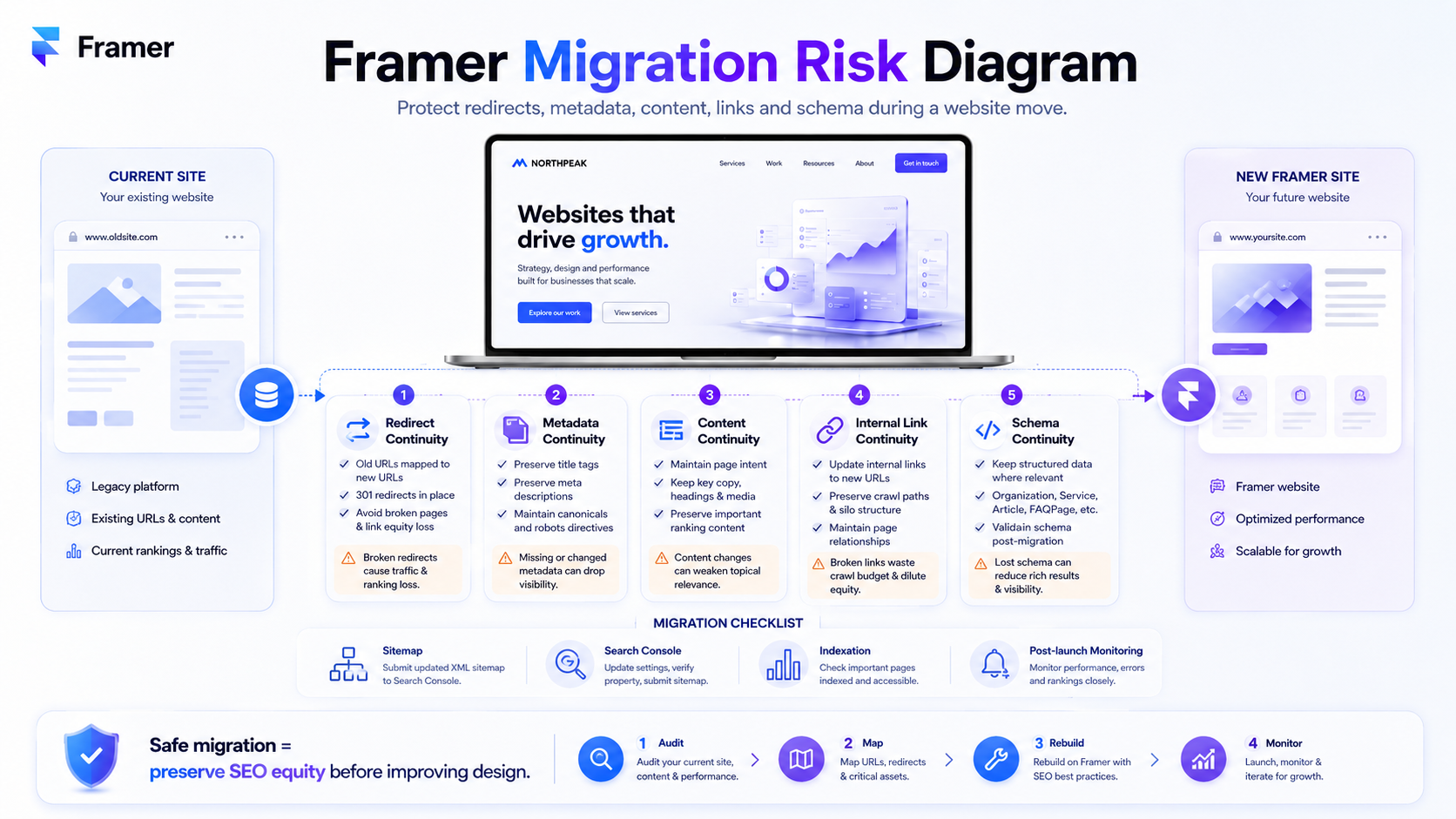
Most businesses don't lose SEO during a Framer migration because of Framer. They lose it because nobody mapped the redirects, the metadata wasn't carried over, or the new URL structure broke the topical clusters that took years to build.
The cost of getting that wrong can be severe: organic traffic can drop sharply after a poorly managed migration, and recovery in competitive markets can take months if redirects, metadata, content depth, or internal links are mishandled. That's not a Framer problem. It's a migration discipline problem, and it shows up regardless of which platform you migrate to.
A Framer migration is the process of moving an existing website from another platform (WordPress, Wix, Webflow, Squarespace, custom-built) to Framer while preserving the SEO equity, structured data, content relationships, and ranking positions the previous site earned. The platform-side of the work is what most "how to migrate to Framer" content covers. The SEO-side is what determines whether the migration is a transition or a setback.
This guide focuses on the SEO-side, organised by source platform - because the redirect logic, content extraction, and risk profile change meaningfully depending on what you're migrating from. We Optimizz has run migrations to and from every major platform, and the patterns are consistent enough to be predictable.
For the broader Framer context, our team covers the platform overall in the complete Framer website design and SEO guide.
Table of contents
The five risks that destroy SEO during any Framer migration
Migrating from WordPress to Framer
Migrating from Wix to Framer
Migrating from Webflow to Framer
Migrating from Squarespace, Shopify, or custom-built sites
The pre-migration audit
Implementation: redirect mapping done right
The first 30 days post-launch
Why DIY Framer migrations are risky
FAQ
The five risks that destroy SEO during any Framer migration
Before the platform-specific guidance, these are the risks that show up in every migration regardless of source. Get these five right and you've removed most of the avoidable migration risk; get them wrong and the platform doesn't matter.
Redirect mapping.
Every URL on the old site needs a 301 redirect to the most relevant URL on the new site. Missed redirects mean lost rankings, broken backlinks, and traffic that doesn't recover until pages are re-discovered, re-crawled, and re-indexed. This is where most migration disasters start.
Metadata preservation.
Title tags, meta descriptions, and heading structures carry ranking signals. Wholesale rewriting during migration without keyword research means the new pages compete for different terms than the old ones - and the old rankings disappear.
Content equivalence.
Pages that ranked well did so because of specific content. Migrating a 2,000-word guide to a 400-word page - even on the same URL - kills the rankings the long-form version earned. Match content depth to what the page was ranking for, not to what fits the new design.
Internal link architecture.
Old sites have years of internal links routing authority to important pages. New designs often restructure navigation, break old link patterns, and orphan pages that previously received internal authority. Map the old internal link structure before redesigning navigation.
Structured data continuity.
Schema markup that signals entity relationships, organization data, breadcrumbs, and content types needs to be re-implemented on the new site. Migrating without schema strategy means losing rich result eligibility and AI extraction signals the old site had. For the technical SEO setup that supports migration, our Framer SEO checklist covers metadata, schema, redirects, and post-launch checks in more detail.
The first 30 days after launch are the most important window for catching migration issues before they become harder to diagnose. Indexation issues, redirect failures, and content gaps caught in week one are recoverable. The same issues caught months later are usually harder and slower to fix.
Migrating from WordPress to Framer
WordPress migrations are one of the most common Framer migration scenarios, and they carry the most SEO risk because WordPress sites typically have:
the deepest content libraries (often hundreds or thousands of pages)
the most complex URL structures (categories, tags, archive pages, pagination)
the most plugins generating SEO behaviour (Yoast, Rank Math, schema plugins, redirect managers)
the longest accumulated authority - which means the most to lose
The redirect challenge.
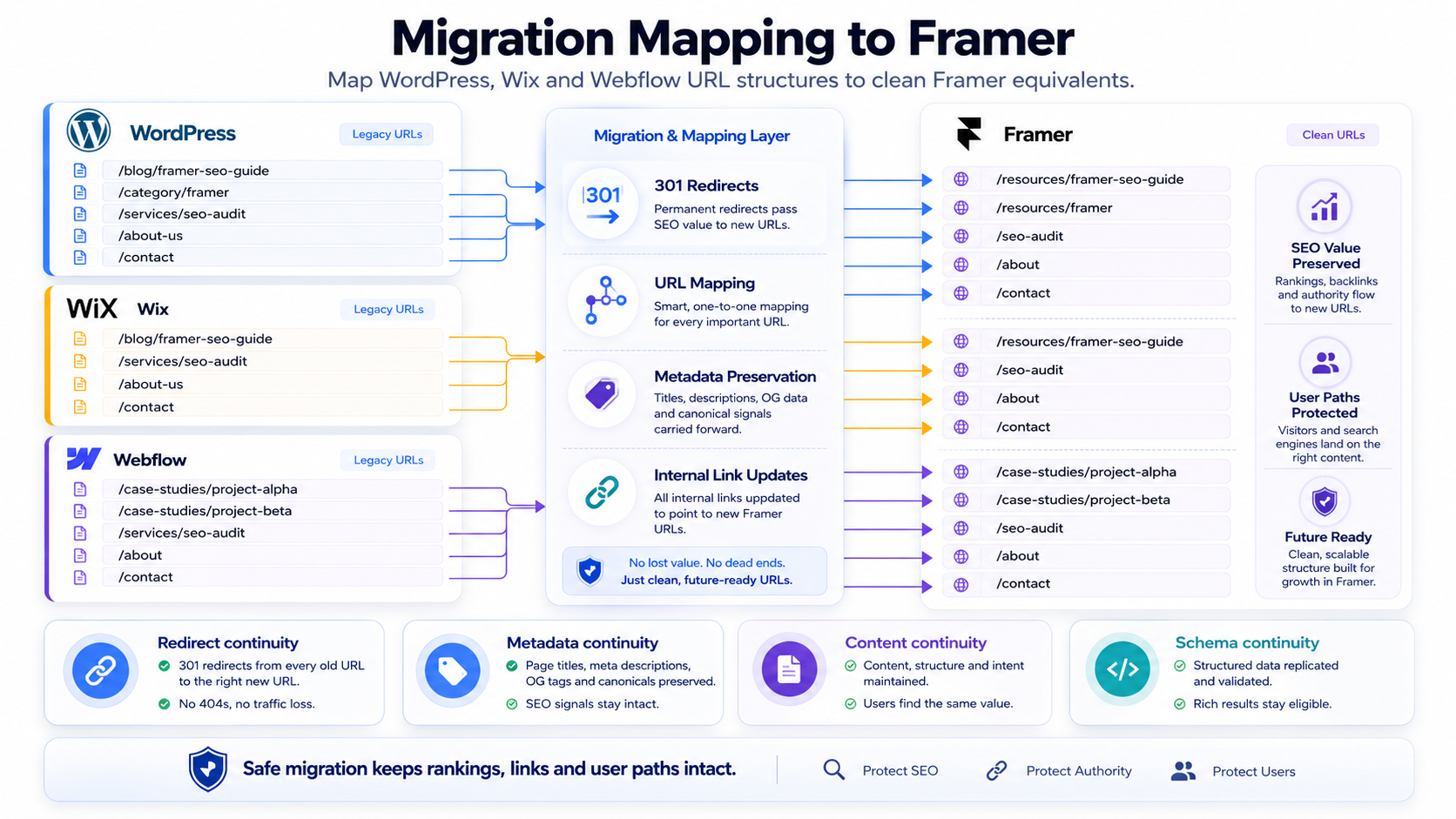
WordPress URLs follow patterns Framer doesn't replicate natively: /category/post-name/, /tag/topic/, /2023/04/article-title/, /author/name/. Every meaningful old URL needs a 1:1 redirect to the closest equivalent on the new Framer site, or a redirect to the parent topic if the page is being consolidated.
The content extraction challenge.
WordPress content lives in a database with custom fields, shortcodes, taxonomies, and embedded media. Extracting cleanly into Framer's CMS requires deciding what stays in CMS versus what becomes static pages, what taxonomies map to Framer's CMS structure, and what custom fields are preserved versus dropped.
The schema migration challenge.
WordPress sites with Yoast, Rank Math, or Schema Pro have built-in schema generation. Framer requires manual JSON-LD via custom code. Audit the schema types the old site used (Article, Organization, FAQPage, BreadcrumbList, Product, Recipe) and rebuild them in Framer's CMS templates before launch.
Common WordPress migration mistakes:
migrating only the top-level pages and assuming category/tag pages don't matter (they often carry significant authority)
letting the new design dictate URL structure without mapping back to the old ranking patterns
losing meta descriptions because Framer doesn't import them automatically
breaking image references when media library URLs change
WordPress to Framer is rarely a one-week project. The technical migration is fast; the SEO-aware migration takes longer because the sitemap is bigger and the link patterns are deeper.
Migrating from Wix to Framer
Wix migrations are technically simpler but carry their own risks because Wix's URL structure and SEO controls work differently from Framer's.
The redirect challenge.
Wix URLs often include /post/ segments, language-prefix paths, and query parameters that don't translate directly to Framer. Wix sites can also have automatically generated URLs and app-specific pages that are easy to miss in a crawl. Every Wix URL needs to be mapped - including blog posts, service pages, product pages, and app-generated pages - to clean Framer equivalents.
The blog content challenge.
Wix Blog stores content in Wix's CMS with proprietary structures. Extracting blog posts to Framer's CMS requires re-uploading images, reformatting embeds, and rebuilding any Wix-specific elements (galleries, accordions, video components) using Framer's primitives.
The schema continuity challenge.
Wix generates basic schema automatically; Framer doesn't. If the Wix site had Article, FAQPage, or LocalBusiness schema active, those need manual JSON-LD reimplementation in Framer.
Common Wix migration mistakes:
losing page titles because Wix's SEO panel data doesn't export to Framer
breaking image SEO when Wix's CDN URLs change to Framer's
missing redirects for /blog/post-name URLs that don't follow Wix's standard pattern
ignoring multilingual setup if the Wix site used Wix Multilingual
The Wix → Framer migration is often pitched as straightforward. The platform-side is. The SEO-side requires the same discipline as any migration.
Migrating from Webflow to Framer
Webflow migrations are the most technically smooth because Webflow and Framer share architectural similarities - both are visual builders with CMS, both can produce relatively clean front-end output, both serve via CDN. The risks are subtler.
The CMS structure challenge.
Webflow's Collections and Reference fields don't map 1:1 to Framer's CMS. Multi-reference fields, nested collections, and conditional visibility need redesign rather than direct migration.
The interaction migration challenge.
Webflow's interactions and animations don't transfer to Framer. Sites with significant Webflow interactions need rebuilt animation logic in Framer's animation system.
The redirect challenge.
Webflow URLs are usually clean, which makes redirect mapping simpler. The risk is assuming "clean URLs migrate themselves" - they don't. Every URL still needs an explicit 301.
Common Webflow migration mistakes:
assuming Webflow's SEO settings (title, description, OG image) export to Framer (they don't)
breaking Collection page templates by recreating them without matching the old URL structure
losing custom code embeds that handled schema, tracking, or third-party integrations
migrating without mapping Webflow's automatic 301 redirect rules to Framer's redirect system
Webflow → Framer is the migration where teams most often skip the SEO audit because "both platforms are modern". The pages still rank because of content and links, not because of platform similarity. The migration discipline applies the same way.
Migrating from Squarespace, Shopify, or custom-built sites
Squarespace.
URL structures with /s/ prefixes, /blog/post-title patterns, and Squarespace-specific page slugs need full redirect mapping. Squarespace's built-in SEO tools generate metadata that doesn't export - every page needs manual title/description carry-over.
Shopify.
Migrating from Shopify usually means moving away from e-commerce - which is itself a strategic decision. If ecommerce revenue is central to the business, Shopify to Framer should usually be treated as a strategic platform decision, not a standard website migration. If the new Framer site keeps any commerce functionality, it needs integrations rather than native handling. Product pages, collection pages, and customer account flows all need explicit migration plans.
Custom-built sites.
The most variable scenario. URL structures, schema implementations, and CMS architectures depend entirely on how the original site was built. Custom sites often have the cleanest migrations (because the team understands the source) or the messiest (because original developers are gone and the codebase is undocumented).
For all three, the redirect mapping principle stays: every meaningful old URL needs a 1:1 redirect or a justified consolidation redirect to the parent topic.
The pre-migration audit
Before the migration starts, the audit determines whether the project succeeds. This is where most avoidable migration risk gets resolved - or ignored.
Crawl the existing site.
Use Screaming Frog or Sitebulb to generate a complete URL inventory. This is the source-of-truth document for redirect mapping.
Pull Search Console data.
Export the last 12 months of top-performing URLs by clicks, impressions, and keywords. Pages that drive significant organic traffic are migration priorities.
Identify the top 100 ranking pages.
Sort by organic traffic. These pages need 1:1 redirects, content equivalence checks, and metadata preservation. Lower-traffic pages can use consolidation redirects to topic parents.
Document the schema in use.
Run pages through Schema.org's validator or Google's Rich Results Test. Note which schema types are active and which need rebuilding in Framer.
Map the internal link structure. Identify pillar pages, supporting content, and link patterns. New navigation needs to preserve or improve this - never randomly restructure.
Backup everything.
Database exports, media library snapshots, redirect rule exports, sitemap snapshots, full-site crawls. If something goes wrong post-launch, the audit data is what you compare against.
Migration scope also affects cost. Our Framer pricing guide explains how migration scope changes the project investment.
Implementation: redirect mapping done right
Redirects are where migrations live or die. Three principles:
1:1 wherever possible.
Old URL → equivalent new URL. Same topic, same intent, same depth. This preserves the most ranking signal.
Consolidation when 1:1 isn't appropriate.
If you're combining three thin pages into one comprehensive page, redirect all three old URLs to the new consolidated URL. Don't redirect to the homepage - that's a soft 404 in Google's eyes and loses the equity.
No redirect chains.
Old URL → new URL, one hop. If the migration is the second migration in two years, fix the previous redirect chains so old URL → current URL directly. Each chain step bleeds equity.
Implement redirects in Framer's redirect system before pointing the domain. Test every redirect in incognito mode using a representative sample (top 50 URLs minimum) before going live.
The first 30 days post-launch
The launch isn't the finish line - it's the start of the monitoring window where problems are still cheap to fix.
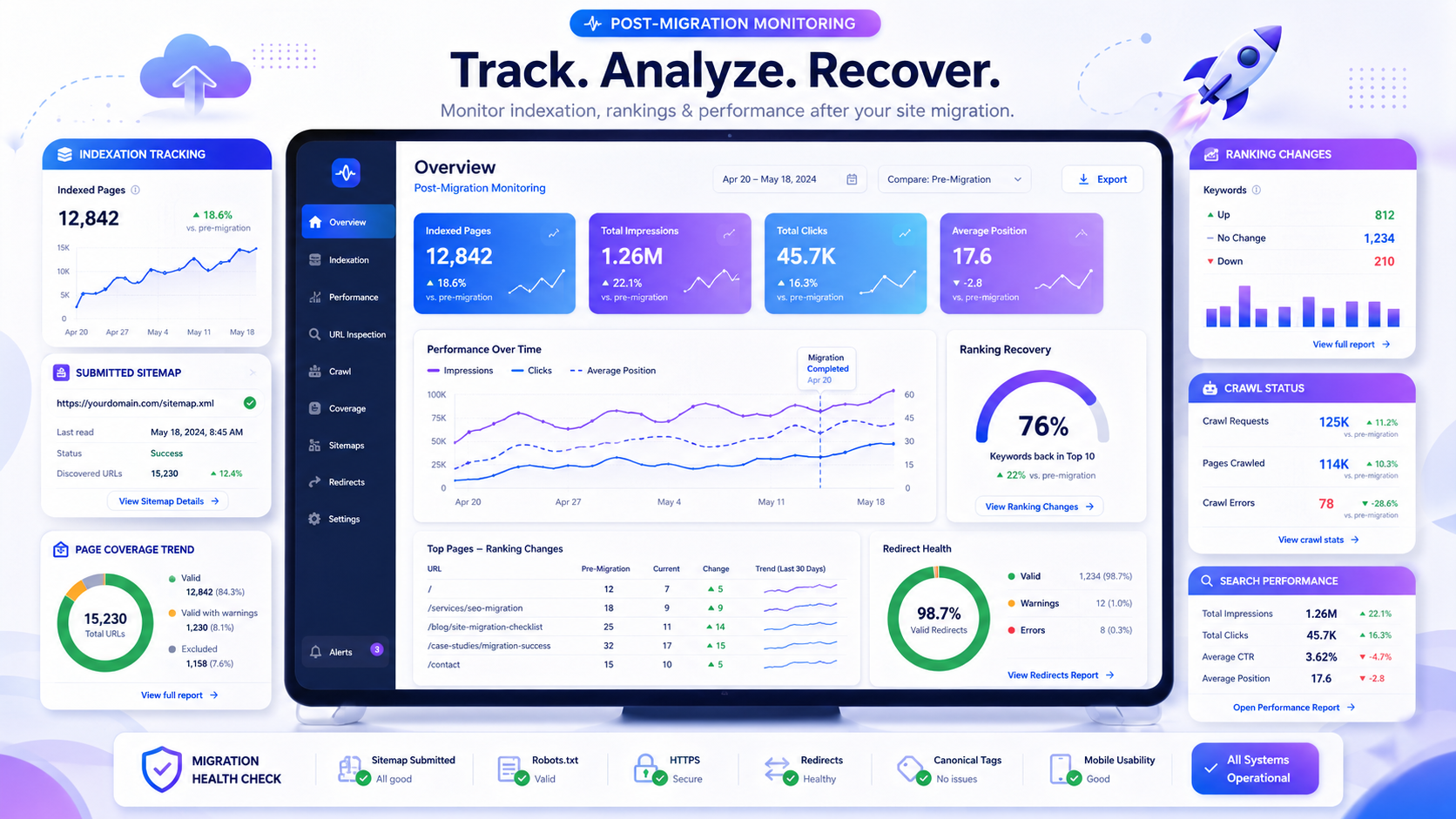
Day 1: Submit the new sitemap to Google Search Console. Verify domain and HTTPS. Spot-check top 20 redirects. Confirm robots.txt isn't blocking production.
Week 1: Daily indexation checks in Search Console. Crawl errors, soft 404s, redirect failures, blocked resources. Issues caught in week one are usually easier to fix than issues discovered months later.
Week 2–4: Monitor ranking changes for top 50 keywords. Some volatility is normal as Google reprocesses the site. Sustained drops on individual pages indicate redirect or content issues that need investigation.
Month 2–3: Compare organic traffic to pre-migration baseline. A well-executed migration usually shows controlled volatility rather than unexplained collapse. Compare organic traffic, indexed pages, and rankings against the pre-migration baseline to spot structural issues.
Month 4–6: Recovery completion for competitive keywords. If rankings have not recovered after several months, do not assume the site will self-correct. Run a follow-up migration audit to check redirects, content equivalence, internal links, indexation, and schema continuity.
This monitoring window is what separates migrations that recover quickly from migrations that linger in the "we used to rank for that" graveyard.
Why DIY Framer migrations are risky
Framer's documentation makes the platform-side of migration look manageable. The visual editor is accessible, the CMS is straightforward, the redirect system works.
What the documentation can't teach is the SEO-side judgment: which URLs deserve 1:1 redirects versus consolidation, which content needs to stay long-form, which schema types matter for the business, how to spot a redirect chain in Search Console data, when a ranking drop is volatility versus a structural issue.
DIY migrations often struggle on these judgment calls. The build looks good, the launch goes smoothly, and traffic starts dropping after launch. By the time the team understands why, the recovery work is more expensive than the migration planning would have been.
We Optimizz has delivered 894 websites across 35+ countries and holds a 4.9/5 rating across 96 reviews.
Our team has completed 299 Wix Marketplace projects, is a Wix Legends Partner since 2022, and is Semrush Certified. We run platform-agnostic SEO programmes across Wix Studio, WordPress, Shopify, and Framer - which means we've migrated sites in every direction and understand what breaks where.
Our Framer migration approach:
pre-migration audit covering URL inventory, top-performing pages, schema mapping, and internal link structure
redirect strategy with 1:1 mapping for top traffic URLs and justified consolidation for the rest
metadata and content preservation aligned to keyword research from the audit
schema reimplementation in Framer's CMS templates before launch
30-day post-launch monitoring with daily indexation checks in week one
follow-up audit at month three to catch issues that took longer to surface
Book a discovery call and we'll walk you through the migration approach for your specific source platform, what scope makes sense, and what timeline to expect. Many Framer migration projects run six to twelve weeks from audit to post-launch monitoring completion, depending on site size, content volume, and migration complexity.
Key takeaway: Most Framer migrations don't lose SEO because of Framer - they lose it because of redirect mapping, metadata loss, content compression, broken internal link patterns, and missing schema continuity. The platform-side of migration is fast; the SEO-side is what determines whether the migration is a transition or a setback. Source platform changes the specific risks, but the fundamental discipline stays the same: audit before, map carefully, monitor relentlessly.
FAQ
How long does a Framer migration take?
Many Framer migration projects run six to twelve weeks from pre-migration audit to post-launch monitoring completion, depending on site size, content volume, and migration complexity. The build itself can be faster; the SEO discipline around it is what extends the timeline.
Will I lose my Google rankings when migrating to Framer?
A Framer migration does not have to cost rankings if it is done with proper redirect mapping, metadata preservation, content equivalence, and schema reimplementation. Some short-term volatility in the first weeks is normal as Google reprocesses the site. Sustained ranking drops indicate migration mistakes that need correction.
How do I migrate from WordPress to Framer without losing SEO?
Crawl the existing site to generate a complete URL inventory, identify top-performing pages from Search Console, map every meaningful URL to a 1:1 redirect on Framer, preserve title tags and meta descriptions, rebuild active schema types in Framer's CMS templates, and monitor indexation daily in the first week post-launch.
Can I migrate from Wix to Framer myself?
Technically yes - Framer's editor is accessible. Practically, the SEO-side requires migration judgment that usually comes from SEO experience: redirect strategy, metadata preservation, schema reimplementation, and post-launch monitoring. DIY migrations on revenue-critical sites are where SEO equity most often gets destroyed.
Does Framer support 301 redirects?
Yes. Framer's redirect system handles 301 redirects through site settings. Map every redirect before pointing the domain, test using a representative sample, and verify after launch using Search Console's URL Inspection tool.
What's the biggest mistake businesses make when migrating to Framer?
Treating the migration as a design project instead of an SEO project. The platform-side of Framer is forgiving; the SEO-side is unforgiving. Migrations that prioritise design and treat redirects, metadata, and schema as launch-week tasks consistently underperform compared to migrations that lead with the SEO audit.
Author bio
Barry Roodnat is the founder of We Optimizz, a Wix Legends Partner since 2022, Semrush Certified SEO Specialist, and recipient of the Wix Developer Award. He builds platform-agnostic websites across Wix Studio, WordPress, Shopify, and Framer, with SEO and GEO as the foundation rather than an afterthought. LinkedIn
Websites that
launch and convert.
We build Framer sites that rank, load fast, and turn visitors into clients. Strategy first. Design second. Results always.