Wix SEO Diagnostic: Find What Killed Your Rankings Before You Lose More Traffic
By Barry Roodnat — Wix Legends Partner since 2022. Published 1 May 2026.
Monday morning. Coffee in hand. You open Search Console and the line you have been watching for six months has just dropped off a cliff. Twelve of your money keywords lost positions over the weekend. Nobody on your team made changes. So what happened?
Or maybe it is the other version. No cliff, no Monday-morning shock, just three months of rankings drifting down a few positions at a time, and traffic that has quietly halved while you were busy running the business.
Either way, the panic is the same and the question is the same: what broke, and how fast can it be fixed?
Wix ranking drops are not random. After diagnosing ranking problems across 894 Wix websites in 35+ countries, the same uncomfortable pattern keeps showing up: the cause is almost always one of twelve issues. But the order in which you check them depends entirely on how the drop happened.
That is what most Wix SEO audit guides get wrong. They give you a list. This Wix SEO diagnostic gives you a recovery path.
This guide does three things. First, it shows you which of three drop scenarios you are actually in. Second, it walks you through the twelve checks in the right order for your situation. Third, it tells you which fixes you can do yourself and which ones can hurt your rankings further if you guess wrong.
This is not a general Wix SEO audit checklist. It is a damage-control diagnostic for business owners and marketing managers who need to know what changed, what matters, and what to fix first.

Step 1 — Pick your diagnostic path
Before you check anything, identify which drop pattern matches what you are seeing. The same twelve checks apply to most Wix ranking drops, but the order matters.
Across We Optimizz diagnostics on Wix ranking drops, the cause is usually found fastest when the checks follow the matching drop pattern. Working through them in the right order saves hours and protects you from breaking something else while guessing.
Path A — Sudden ranking drop
Use this path if your rankings dropped 10+ positions in a few days, or if organic traffic fell sharply over a weekend.
Start with these checks:
Check 2 — Has “Let search engines find this page” been switched off by mistake?
Check 12 — Did you change a URL without setting up a 301 redirect?
Check 8 — Are there 404 errors on previously-ranking URLs?
Check 1 — Is your Wix site actually indexed in Google?
Check 11 — Did your drop align with a Google algorithm update?
This path is built for urgent drops. The most likely causes are usually accidental visibility settings, broken URLs, deleted pages, indexing problems or a wider Google update.
Path B — Slow traffic decline
Use this path if your Wix traffic dropped gradually over 2–3 months, without one obvious crash.
Start with these checks:
Check 9 — Has a competitor published stronger content for your top keywords?
Check 10 — Did your backlinks disappear or get devalued?
Check 6 — Are your title tags and meta descriptions duplicated, missing or weak?
Check 4 — Did your Wix Core Web Vitals fail in the last 28 days?
Check 5 — Did page speed regress after a recent design change or app install?
This path is built for slow erosion. The most likely causes are content decay, stronger competitors, weaker authority, poor click-through rate or performance issues that build over time.
Path C — New Wix site never ranked
Use this path if your Wix site launched but never gained meaningful visibility in Google.
Start with these checks:
Check 1 — Is your Wix site actually indexed in Google?
Check 2 — Has “Let search engines find this page” been switched off by mistake?
Check 3 — Are your robots.txt and sitemap.xml accessible and accurate?
Check 6 — Are your title tags and meta descriptions duplicated, missing or weak?
Check 7 — Did your internal linking break after a URL change or page deletion?
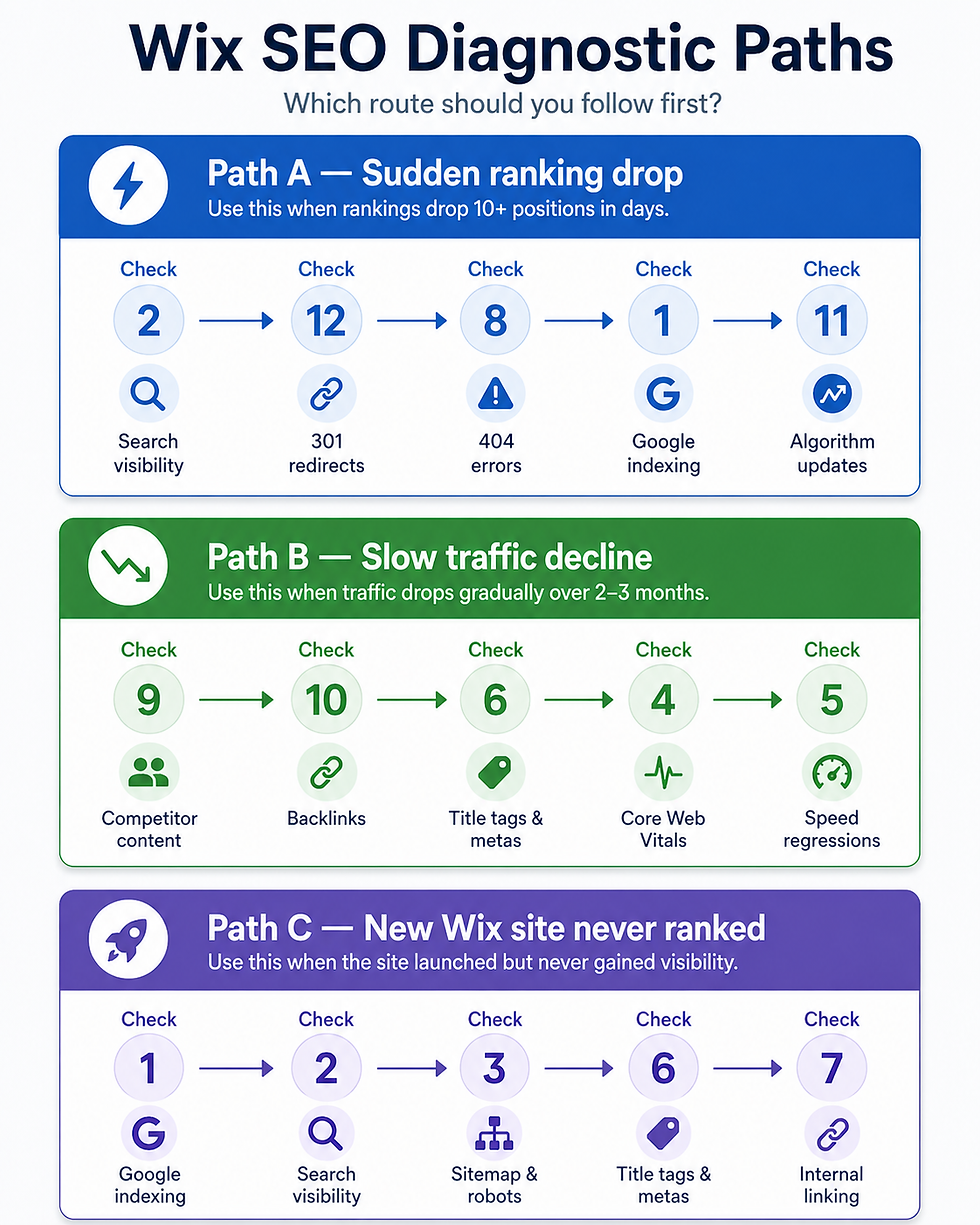
This path is built for new or relaunched Wix sites. The most likely causes are indexing, crawl access, weak metadata, thin internal linking or pages that Google has not been given enough reason to trust yet.
Step 2 — The 12 checks
Use the order above for your path. Each check below explains what to look for, where to find it in Wix or Google, what a pass and fail look like, and how serious the fix is.
Check 1 — Is your Wix site actually indexed in Google?
Most owners check rankings first. Google checks existence first.
A page that is not in Google’s index cannot rank, no matter how strong the design, copy or offer looks. That makes this the cheapest check to run and one of the most damaging issues to miss.
If this fails, do not rewrite content yet. First find out why Google cannot see the page.
How to spot this in Google:
Open Google and search:
site:yourdomain.com
Replace “yourdomain.com” with your actual domain.
Then check whether your homepage, service pages, product pages, blog posts and key landing pages appear.
You can also check individual URLs in Google Search Console using URL Inspection.
Google’s own indexing documentation is a useful reference if you want to understand the basics:https://developers.google.com/search/docs/crawling-indexing
Pass:
Your homepage appears in Google.
Your key money pages appear in Google.
Your important blog posts, service pages or product pages are visible.
The indexed URLs match your current live URLs.
Fail:
No results appear for your domain.
Only old URLs appear.
Important ranking pages are missing.
Google Search Console says “Discovered — currently not indexed” or “Crawled — currently not indexed” for important URLs.
Fix complexity:
Owner-fixable if only a few pages are missing. Submit the URLs through Search Console and inspect them for errors.
If a large share of your pages are missing, pause before changing anything. That can point to a crawl, sitemap, canonical or visibility issue.
For a deeper walkthrough, use our complete Wix indexing fix walkthrough:https://www.we-optimizz.com/post/wix-site-not-indexed-google-fix
Check 2 — Has “Let search engines find this page” been switched off by mistake?
It is the worst kind of cause to find: a setting flipped accidentally three weeks ago that nobody noticed.
This check takes less than a minute. Do it before you assume Google hates your content.
How to find this in Wix:
Go to your Wix Dashboard.
Open Website & SEO.
Go to SEO.
Choose Edit by Page.
Open the affected page.
Check whether “Let search engines find this page” is switched on.
Pass: every page that should rank has the setting switched on, is published, and is not hidden from search.
Fail: the setting is off on a page that used to rank, or a duplicated page inherited the wrong default.
Fix complexity:
Owner-fixable.
Switch the setting back on, republish the site, then request indexing for the affected URL in Google Search Console.
Recovery from a Wix visibility-toggle issue often starts within 3–7 days after Google crawls the page again, assuming there are no other issues.
Check 3 — Are your robots.txt and sitemap.xml accessible and accurate?
Your sitemap tells Google what to crawl. Your robots.txt file tells Google what not to crawl.
When either one is wrong, the consequences can be quiet. Pages simply stop appearing in search results, and there may be no obvious warning in Wix.
Where to check:
Open these URLs in your browser:
In Wix, also check:
Dashboard → Website & SEO → SEO → Tools and Settings
In Google Search Console, check whether your sitemap has been submitted and processed successfully.
Pass:
Your sitemap loads correctly.
Important live URLs appear in the sitemap.
Your robots.txt file does not block key pages.
Google Search Console shows the sitemap as processed successfully.
Fail:
The sitemap does not load.
The sitemap shows old or incorrect URLs.
Important pages are missing from the sitemap.
Robots.txt contains rules that block important sections of your site.
Fix complexity:
Mostly owner-fixable for the sitemap. Resubmit it in Google Search Console and check for errors.
Custom robots.txt edits should be reviewed carefully. A wrong rule can block important pages from being crawled, and in extreme cases it can damage visibility across the whole site.
If checks 1 to 3 passed, your Wix site is being seen by Google. The next two checks ask whether it is being seen well.
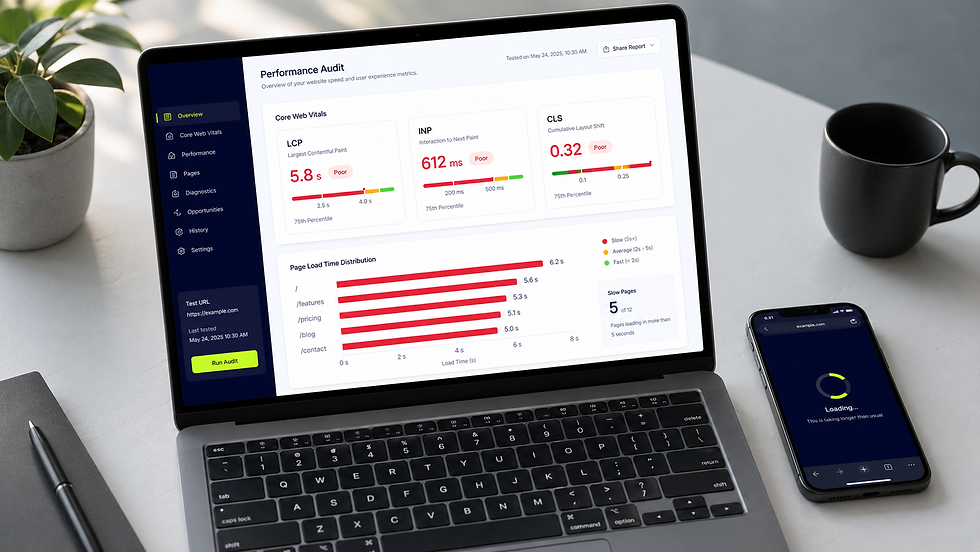
Check 4 — Did your Wix Core Web Vitals fail in the last 28 days?
Before 2021, many business owners could ignore page experience and still rank if the content and authority were strong enough. That margin is thinner now.
Core Web Vitals do not replace relevance, backlinks or search intent. But when two pages are close, speed, responsiveness and visual stability can decide which one users prefer and which one Google trusts more over time.
This is also where Wix sites can be misleading. The page may feel fine in the editor, on office Wi-Fi, on a desktop screen. Real mobile users may experience something different: a hero image shifting, a booking widget delaying interaction, a script blocking the first tap, or a gallery that looks elegant but loads heavily.
This is the check most owners blame too quickly and fix too broadly.
Run this check from:
Wix Studio:
Dashboard → Site & Mobile App → Website Performance
Then test the affected URLs in Google PageSpeed Insights.
Look specifically at mobile performance and field data from the last 28 days.
Pass:
Your key pages pass Core Web Vitals.
Mobile performance is stable.
There are no major layout shift, responsiveness or loading warnings.
Fail:
Important pages fail Core Web Vitals.
Mobile performance is poor.
The page has layout shift, slow scripts or heavy above-the-fold media.
A recent design change made the page slower.
Fix complexity:
Mixed.
Compressing images, removing unnecessary animations and simplifying hero sections are usually owner-level fixes.
Layout shift, slow scripts, embedded tools and complex Wix Studio templates often need a developer.
As a Wix Legends Partner since 2022, we see the same Core Web Vitals regressions repeatedly: oversized hero media, layout shift, heavy third-party scripts and app elements added across the whole site.
For the most common fixes, use our step-by-step Wix speed fix guide:https://www.we-optimizz.com/post/fix-wix-slow-site
Check 5 — Did page speed regress after a recent design change or app install?
The useful question is not “Is my Wix site fast?” The useful question is “Did it become slower shortly before rankings softened?”
Speed regression is separate from Core Web Vitals because the data answers a different question. Core Web Vitals tell you there is a performance issue. This check helps you find what caused it.
The most common Wix traffic drops we see often start within two weeks of a design refresh, a new booking widget, a chat tool, a video background or tracking scripts added site-wide.
Where to check:
Look at your recent Wix changes.
Check whether you recently added:
A video background.
A large image gallery.
A booking widget.
A chat tool.
A reviews widget.
Extra tracking scripts.
A new Wix app.
A redesigned homepage hero section.
Then compare the affected pages in PageSpeed Insights.
Pass:
Page speed is similar to before the ranking drop.
No heavy new design sections or apps were added before traffic declined.
Mobile loading remains stable.
Fail:
Speed dropped after a redesign.
A new app or widget is loading on every page.
The affected page became heavier after new media, scripts or animations were added.
Fix complexity:
Often owner-fixable if the cause is obvious.
Remove or replace the latest heavy element first. Do not redesign the whole page until you have tested the most recent change.
Custom-coded apps, embedded scripts and complex templates may need a developer.
Check 6 — Are your title tags and meta descriptions duplicated, missing or weak?
Titles and meta descriptions are familiar territory, so do not overcomplicate them.
They rarely cause a sudden ranking crash on their own. They usually create slower problems: weak click-through rate, unclear relevance, and Google rewriting titles because it does not trust yours.
This check matters most for slow declines and new Wix sites that never gained traction.
How to find this in Wix:
Go to:
Wix Dashboard → Website & SEO → SEO → Edit by Page
Review each key page’s:
Title tag.
Meta description.
URL slug.
Target keyword.
Search intent.
Pass:
Every important page has a unique title tag.
Every important page has a clear meta description.
The title matches what the page is actually about.
Pages do not target the same keyword unless they serve clearly different intent.
Fail:
Multiple pages use the same title.
Titles are missing.
Meta descriptions are duplicated across templates.
A title is vague, generic or not aligned with the page’s real search intent.
Fix complexity:
Owner-fixable for individual pages.
If duplication comes from dynamic pages, product feeds, blog templates or CMS collections, the fix may be structural and should be reviewed before changing templates site-wide.

Need the fast version of this Wix SEO diagnostic?
You are six checks in. If this already feels like too much to verify manually, run the free We Optimizz SEO scan.
It checks the main Wix SEO blockers automatically and sends you a prioritised issue list in under 60 seconds.
Run Free SEO Scan:https://www.we-optimizz.com/free-seo-scan
Check 7 — Did your internal linking break after a URL change or page deletion?
Internal links pass authority and tell Google which of your pages matter.
When you rename a URL, delete a page or restructure navigation without updating links, a previously strong page can become isolated. Pages with weak internal links rarely hold rankings for long in competitive results
We have seen this hide behind every other cause on this list.
How to find this in Wix:
Open your Wix Editor.
Go to Menus & Pages.
Review the main menu, footer menu, buttons, image links and text links.
Then manually check important pages on the live site.
Look for links pointing to:
Deleted pages.
Old URLs.
Hidden pages.
Wrong service pages.
Pages that now redirect.
Pass:
Important pages are linked from the homepage, menu, footer or relevant internal pages.
Blog posts link to relevant service pages where it makes sense.
Old internal links have been updated after URL changes.
Fail:
Important pages have few or no internal links.
Links point to deleted or outdated URLs.
Navigation changed and key pages became harder to find.
A page that used to rank is no longer linked from strong pages.
Fix complexity:
Owner-fixable for small sites.
For Wix sites with more than 50 pages, a crawl-based audit is usually better. Tools like Screaming Frog can find broken internal links that are almost impossible to spot manually.
Check 8 — Are there 404 errors on previously-ranking URLs?
A few 404 errors are harmless. A 404 on a page that used to bring leads is not.
This often happens after a redesign, cleanup, page deletion, CMS change or URL update. The team thinks it removed clutter. Google sees a ranking URL disappear.
How to spot this in Google:
Open Google Search Console.
Go to Indexing.
Open Pages.
Look for “Not found (404)”.
Check whether any of the listed URLs used to rank or bring organic traffic.
You can also test old URLs directly in your browser.
Pass:
Only irrelevant or low-value URLs return 404.
Important pages are live.
Old high-value URLs redirect to the closest matching live page.
Fail:
A former ranking page now returns 404.
A service page, product page or blog post disappeared.
Old URLs were deleted during a redesign.
Google Search Console shows important pages under “Not found.”
Fix complexity:
Owner-fixable when the page can simply be restored.
If the page has been replaced, set up a clean 301 redirect to the closest matching live page.
Do not redirect everything to the homepage. Google can treat irrelevant redirects as soft 404s, which means the redirect does not pass the value you expect.
Everything from here on is harder to fix in an evening. These last four checks are where experienced eyes start to pay for themselves.
Check 9 — Has a competitor published stronger content for your top keywords?
This is the check most owners do last. Most owners are wrong.
Not every Wix ranking drop is technical. Sometimes your page is still technically fine, but a competitor has published a better answer, matched the intent more clearly, added proof, improved structure, or turned a thin service page into the page Google now prefers.
This is the most uncomfortable diagnostic result because nothing is “broken” in the normal sense. Your page loads. It is indexed. It has a title. It has links. But the SERP moved on without you.
We see this most often in slow declines. One month you lose two positions. The next month another page slips from position four to eight. Nobody panics because nothing collapsed. Then three months later, the traffic loss is obvious.
The wrong fix here costs more than the right fix saves.
Where to check:
Search your affected keyword in Google.
Use an incognito window or neutral browser where possible.
Compare your page with the top three results.
Look at:
Search intent match.
Page structure.
Depth of answer.
Freshness.
Examples.
FAQs.
Trust signals.
Internal links.
Commercial clarity.
Author or company credibility.
Pass:
Your page still answers the query better than competing pages.
Your page matches the current search intent.
The content is specific, useful and up to date.
Users get a clear next step.
Fail:
Competitors explain the topic more clearly.
Competitors include stronger examples or FAQs.
Their page better matches commercial intent.
Their content is newer, deeper or more useful.
Your page is too generic or too thin.
Fix complexity:
Strategic, not technical.
Adding more words rarely fixes this. The page needs to match the searcher’s current intent better than the competition.
If five pages are losing to the same competitor, the problem is not one article. It is positioning, authority and content strategy.
Check 10 — Did your backlinks disappear or get devalued?
Backlinks still matter. Anyone telling you otherwise is probably trying to sell you a shortcut.
External links carry trust, discovery and authority signals. When a strong website removes a link, changes it to nofollow, deletes the linking page or loses visibility itself, your rankings can soften before anything changes on your own Wix site.
This is especially common with older sites that once relied on directories, partner links, press mentions or industry pages.
Run this check from:
A backlink tool such as Ahrefs, SE Ranking or Semrush.
Compare lost backlinks and referring domains around the date your traffic started dropping.
Look for:
Lost links from strong domains.
Lost links to pages that declined.
Links changed to nofollow.
Deleted referring pages.
Partner or directory links removed.
Pass:
Your backlink profile is stable.
No important referring domains disappeared around the drop.
Your highest-value ranking pages still have relevant links.
Fail:
You lost links from trusted websites.
A strong referring page was deleted.
Important links now point to 404 pages.
Links to your declining page disappeared shortly before rankings dropped.
Fix complexity:
Reclamation work is owner-led but slow.
You can contact the original publisher and ask whether the link can be restored. If the linked page was deleted, restore it or redirect it properly.
If link loss is widespread, this becomes a digital PR and authority-building project rather than a one-off fix.
Check 11 — Did your drop align with a Google algorithm update?
This is the check that gets blamed too often and understood too late.
Google updates can affect rankings even when you have changed nothing. But not every dip during an update window was caused by the update. That distinction matters because the wrong reaction can do more damage than the update itself.
A real update hit usually leaves a pattern. Several pages drop together. Similar content types move in the same direction. Competitors with clearer intent, stronger authority or better user satisfaction gain at the same time. A one-page technical issue does not behave like that.
This is also the point in the diagnostic where patience becomes a skill. The first 24 hours after a suspected update are usually noisy. Rankings move, settle, reverse, and move again. Acting too quickly can turn a temporary drop into a permanent mess.
If this looks like an update hit, your first job is not to fix. It is to compare patterns.
Where to check:
Compare the date your traffic dropped with known Google ranking volatility.
A useful starting point is Search Engine Roundtable’s Google Update Tracker:https://www.seroundtable.com/google-update-tracker
Also check whether your competitors moved at the same time.
Pass:
There was no major update or search volatility near the drop.
Only one page changed, and the cause appears technical.
Your competitors did not move in a similar pattern.
Fail:
Several pages dropped at the same time.
The drop matches a known update window.
Competitors gained visibility while your site lost it.
Pages with similar content patterns all declined together.
Fix complexity:
High.
This is where pattern recognition matters most.
After diagnosing post-update drops across 894 Wix sites, our experience is that the wrong reaction often makes recovery slower. Panic rewrites, mass deletions, unnecessary disavows and site-wide template changes can create more problems than they solve.
The right Wix SEO recovery plan depends on which update hit, which pages dropped and which competitors gained. That is rarely something to fix safely in the first 24 hours.
One more technical check. It is last not because it is rare, but because if you missed it earlier, it may still be the easiest thing to fix tonight.
Check 12 — Did you change a URL without setting up a 301 redirect?
Renaming a URL without a redirect is one of the fastest ways to lose rankings.
Google sees the old URL disappear. The new URL does not automatically inherit all the authority, relevance or historical signals from the old page. Even after you fix the redirect, recovery can take time.
How to find this in Wix:
Go to:
Wix Dashboard → Website & SEO → SEO → URL Redirect Manager
Check whether old URLs redirect to the correct new URLs.
Also check any URLs changed during:
A redesign.
A migration.
A category rename.
A blog structure update.
A service page cleanup.
A product URL change.
Pass:
Every changed URL has a clean 301 redirect.
The redirect points to the closest matching live page.
There are no redirect chains.
Important old URLs do not return 404.
Fail:
Old ranking URLs return 404.
Old URLs redirect to the homepage.
A redirect points to an unrelated page.
There are multiple redirect hops.
A bulk slug change was published without redirect mapping.
Fix complexity:
A single redirect is owner-fixable.
A migration, category rename or bulk slug change should be mapped before publishing. If it has already happened, get the redirect map right before making more changes.
Step 3 — What to fix first and what to leave alone
Once your Wix SEO diagnostic identifies the likely cause, the next decision is the expensive one.
Fixing the right issue first can stabilise rankings quickly. Fixing the wrong issue, or changing five things at once, makes it harder to know what worked.
Fix tonight: low-risk, owner-level fixes
These are usually safe to handle yourself:
Re-enable a page’s search visibility.
Resubmit a sitemap.
Request indexing in Google Search Console.
Restore an accidentally deleted page.
Add a 301 redirect for one broken URL.
Rewrite a duplicated or weak title tag.
Improve a missing meta description.
Add relevant internal links from the homepage, menu or blog posts to an affected page.
These fixes are direct, reversible and easy to monitor.
Fix carefully: technical risk, often needs a developer
These issues can be identified by an owner, but fixing them safely may need specialist help:
Core Web Vitals failures caused by complex Wix Studio templates.
Third-party scripts slowing down important pages.
Custom robots.txt rules.
Canonical conflicts.
Bulk URL changes.
Redirect chains.
Structured data errors.
Site-wide template issues.
The risk here is not spotting the problem. The risk is creating a second problem while trying to fix the first one.
Do not touch yet: strategic issues that need analysis
Some issues should not be fixed in a rush:
Competitor content overtaking your page.
Google algorithm update impact.
Major content rewrites.
Link disavow files.
Site-wide content pruning.
Large-scale template changes during an active traffic drop.
If your diagnostic points to content, backlinks or algorithm impact, slow down. The fix usually depends on patterns across multiple pages, not one isolated problem.
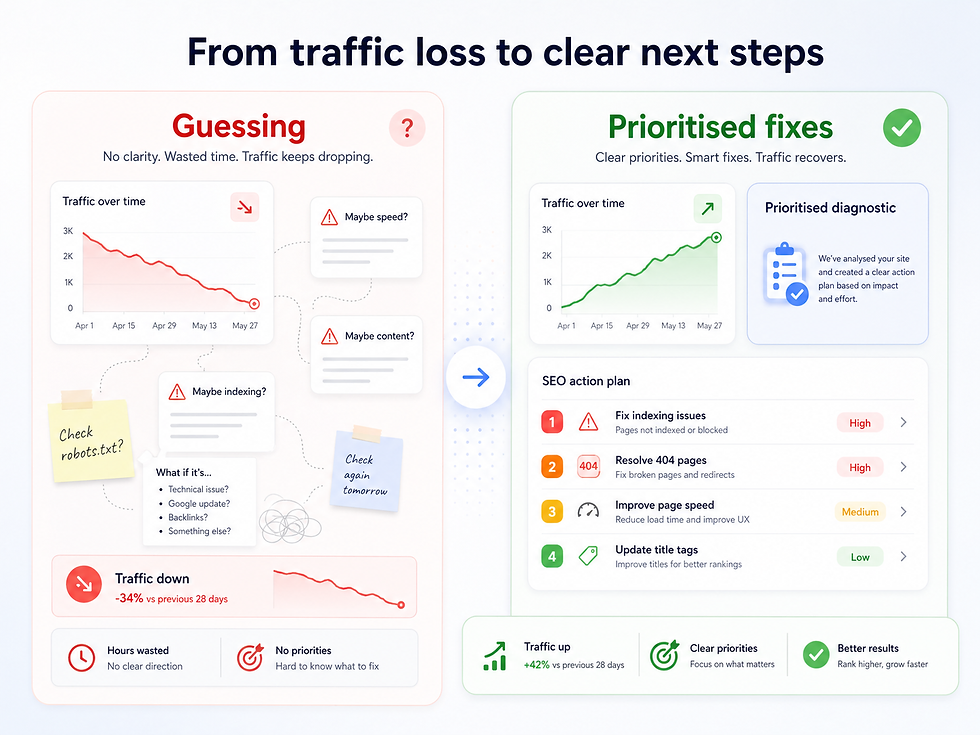
If your diagnostic surfaces five or more issues at once, stop fixing and start prioritising. The recovery timeline depends on fix priority. In our experience, this is where owners lose the most time.
When to stop diagnosing and bring in experienced eyes
A self-diagnostic is useful until guessing becomes more expensive than expert review.
There are three clear signs that you have reached that point.
Signal 1 — You found 5+ issues and cannot tell which one caused the drop.
Fixing the wrong one first delays recovery. Pattern recognition across hundreds of similar Wix sites is what shortens this process.
Signal 2 — Each week of lost traffic costs measurable revenue.
If fewer leads, enquiries, bookings or sales are coming through, the cost of a week spent guessing is higher than the cost of getting a second opinion.
Signal 3 — The drop aligns with a Google update.
Update-related recovery is where the wrong reaction can do the most damage. This is the one scenario where DIY is genuinely riskier than asking.
At that point, getting a second pair of eyes on the diagnostic is usually faster than continuing alone — sometimes that is We Optimizz, sometimes that is another specialist who knows the platform. Not because the diagnostic is impossible, but because prioritising the fixes is where experience compounds fastest.
FAQ — Wix SEO diagnostic and ranking drops
How long does it take to recover from a Wix ranking drop?
Recovery time depends on the cause, not the size of the drop. Indexing, visibility-toggle and redirect-related drops can start recovering within 3–7 days of the fix being crawled. Content and competition-related drops usually take 4–8 weeks because Google has to reassess intent match.
Algorithm-related drops take longer. In many cases, recovery takes 6–12 weeks at minimum and may only resolve fully when a later update runs.
Can a slow Wix site really cause my rankings to drop?
A slow Wix site can contribute to ranking drops when mobile performance, layout stability or third-party scripts weaken user experience. Speed alone rarely causes a sudden cliff, but it can decide which page wins close-call rankings.
In our diagnostics across Wix sites, the pattern is often the same: a recent design change introduced layout shift, heavy media or a slow third-party script, and rankings softened shortly afterwards.
What is the most common cause of a sudden Wix traffic drop?
Sudden Wix traffic drops are most often linked to accidental search visibility settings, broken redirects after URL changes, or important pages returning 404 errors.
At We Optimizz, we check those issues early because they are fast to confirm and often explain sharp drops better than content or backlinks.
Should I run a Wix SEO audit myself or hire an agency?
Run it yourself first if the issue is simple, recent and easy to trace. The 12 checks above will identify the likely cause in many cases, and the easy fixes are genuinely owner-level.
Hiring becomes the cheaper option when the diagnostic shows several issues at once and prioritising them wrong could cost more than expert review.
How fast can We Optimizz diagnose a Wix ranking drop?
With Search Console access, ranking data and Wix editor access, We Optimizz can usually deliver a written diagnostic with prioritised fixes within 48 hours.
If your traffic loss cannot wait, book a 15-minute discovery call and we can tell you whether the case needs a fast diagnostic or a deeper recovery plan.
Book a 15-minute discovery call:https://calendly.com/we-optimizz/discovery-call
The short version
Wix ranking drops are diagnosable, not mysterious.
Pick the path that matches your scenario, run the checks in order, and stop at the first issue that clearly matches the timing of the drop.
If the issue sits in checks 1, 2, 8 or 12, you can probably fix it quickly. These are usually indexing, visibility, 404 or redirect problems.
If the issue sits in checks 9, 10 or 11, the fix is strategic. That means content, authority or algorithm impact. Rushing those fixes usually makes recovery slower.
Either way, the cost of another week of lost Wix traffic is often higher than the cost of getting the cause checked.
Rankings dropped and you need answers fast?
Skip the manual checks. Get a prioritised diagnostic in 60 seconds, or book a 15-minute call if your traffic loss cannot wait.
Run Free SEO Scan:https://www.we-optimizz.com/free-seo-scan
Book a Discovery Call:https://calendly.com/we-optimizz/discovery-call
We Optimizz is a Wix Legends Partner agency based in Hasselt, Belgium. We have built 894 Wix websites across 35+ countries since 2022. Rated 4.9/5 on the Wix Marketplace based on 96 reviews and 299 completed projects.


Comments